If you’re planning to install CP Plus’s high-performance PTZ cameras – the CP-UNP-F4541L30-DPQ (4MP) or CP-UNP-F4551L30-DPQ (5MP) – you need more than just the camera itself. Professional surveillance setups demand the right cables, connectors, and accessories to ensure zero signal loss and reliable 24/7 operation. In this guide, we’ll break down exactly what you need for a flawless installation, plus answer the most common questions installers face.
Understanding These CP Plus PTZ Models
Before diving into installation requirements, let’s understand what makes these cameras special. Both the CP-UNP-F4541L30-DPQ and CP-UNP-F4551L30-DPQ belong to CP Plus’s Ultra Series – their premium line of network PTZ cameras designed for professional surveillance applications.
| Specification | CP-UNP-F4541L30-DPQ | CP-UNP-F4551L30-DPQ |
|---|
| Resolution | 4MP (2688 x 1520) | 5MP (2960 x 1668) |
| Optical Zoom | 45x | 45x |
| IR Range | 300 meters | 300 meters |
| Power Input | PoE+ / 24V AC | PoE+ / 24V AC |
| Network Interface | RJ45 (10/100 Base-T) | RJ45 (10/100 Base-T) |
| Weatherproofing | IP67, IK10 | IP67, IK10 |
| Video Compression | H.265, H.264 | H.265, H.264 |
| Key Difference | Standard 4MP clarity | Enhanced 5MP detail |
The primary difference? Resolution. The 5MP variant captures more detail, making it ideal for applications where facial recognition or license plate identification is critical. Otherwise, both cameras share identical features including Starlight technology for low-light performance, WDR (120dB) for high-contrast scenes, and military-grade IK10 vandal resistance.
Essential Cable Requirements for Professional Installation
Here’s where most installations succeed or fail. These PTZ cameras are network-based, meaning you’ll need proper Ethernet cabling to transmit both data and power. Let’s break down your options.
Critical Insight
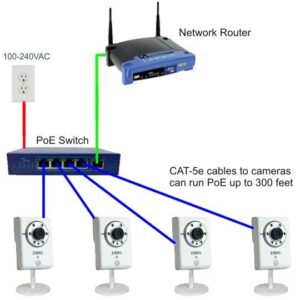
Both cameras support PoE+ (Power over Ethernet Plus), which means a single CAT6 cable can handle both network data and power supply. This simplifies installation dramatically – no separate power cable needed.
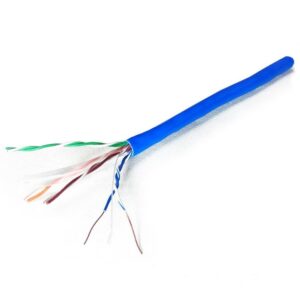
1. Primary Network Cable: CAT6 UTP
For these PTZ cameras, CAT6 UTP (Unshielded Twisted Pair) cable is your backbone. Here’s why CAT6 specifically:
- Bandwidth capacity: CAT6 supports up to 1 Gbps at 100 meters, well above the camera’s 100 Base-T requirement
- PoE+ compatibility: Handles 30W power delivery required for PTZ motors and IR illuminators
- Future-proof: Won’t bottleneck if you upgrade to higher-resolution cameras later
- Interference resistance: Better crosstalk rejection than CAT5e, critical for long outdoor runs
Recommended specification: Use full copper CAT6 UTP cable (not CCA – Copper Clad Aluminum). For outdoor installations, opt for outdoor-rated CAT6 with UV-resistant PE jacket and moisture barrier.
2. Alternative: Separate Power Cable (If Not Using PoE)
If your setup doesn’t include a PoE+ switch or injector, you’ll need to run separate power. Both cameras accept 24V AC input through their power connector.
Power cable requirements:
- 2-core or 3-core power cable (3-core recommended for grounding)
- Minimum 1.0mm² conductor size for runs up to 50 meters
- For longer runs (50-100m), use 1.5mm² or 2.5mm² to minimize voltage drop
- Outdoor-rated with double insulation if running externally
Installation Scenarios: What Cable Setup Works Best
Scenario 1: New Installation with PoE+ NVR
Setup: Direct connection from camera to PoE+ enabled NVR or switch
Required: Single CAT6 UTP cable (outdoor-rated for external runs) + RJ45 connectors or keystone jacks
Why it works: Cleanest installation, single cable carries everything, maximum reliability
Scenario 2: Upgrading from Analog with Existing Power
Setup: Replacing analog PTZ with network PTZ, existing 24V AC power available
Required: CAT6 UTP cable for data + utilize existing power cable (verify 24V AC compatibility)
Why it works: Reuses existing infrastructure, cost-effective upgrade path
Scenario 3: Long-Distance Installation (100m+)
Setup: Camera location exceeds 100-meter Ethernet limit
Required: CAT6 UTP cable + network switch or PoE extender at intermediate point + additional CAT6 run for second segment
Why it works: Extends PoE distance while maintaining signal integrity and power delivery
Essential Connectors and Accessories
Beyond cables, you’ll need quality connectors and accessories for a professional finish. Here’s the complete shopping list.
RJ45 Connectors and Boots
- CAT6 RJ45 connectors: Use shielded or unshielded based on your cable type (minimum qty: 2 per camera)
- Strain relief boots: Waterproof boots mandatory for outdoor terminations to protect RJ45 junction
- Keystone jacks (optional): For wall-plate mounting at both ends – cleaner than exposed connectors
Cable Management
- Conduit or trunking: For surface-mounted runs, use 20mm or 25mm PVC conduit
- Cable ties: UV-resistant for outdoor bundles
- Junction boxes: Weatherproof IP65-rated boxes for outdoor cable splices
- Cable labels: Mark both ends clearly (camera location + date of installation)
Power Accessories (If Not Using PoE)
- 24V AC adapter: Minimum 2A output capacity (check camera’s power consumption spec)
- DC power connectors: Matching the camera’s power input (typically 2.1mm or screw terminals)
- Surge protector: For lightning-prone areas, install inline surge protection on both network and power
Real Installation Example: Large Factory Perimeter
Project: Installing 4x CP-UNP-F4551L30-DPQ cameras for 360° coverage of a manufacturing facility’s perimeter
Challenges:
- Three cameras at 80-meter distance from control room
- One camera at 120-meter distance (exceeds PoE limit)
- All outdoor mounting on 6-meter poles
Solution implemented:
- 350 meters of outdoor-rated full copper CAT6 UTP cable (100m per camera + extra)
- 16-port PoE+ switch in control room
- Single-port PoE extender at 90-meter point for the 120m camera
- Waterproof RJ45 boots at all outdoor terminations
- 25mm UV-resistant conduit for above-ground cable runs
Result: All cameras operational with zero packet loss, full PoE power delivery, and professional weather-sealed finish. System has been running 24/7 for 18+ months without a single cable-related failure.
5 Costly Installation Mistakes to Avoid
1. Using CCA (Copper Clad Aluminum) Cable
CCA cable costs 30-40% less than pure copper, but it’s a false economy. Higher resistance means voltage drop over distance, causing unreliable PoE delivery. PTZ motors may stutter or IR illuminators dim at night. Always specify full copper conductors.
2. Skipping Strain Relief Boots
Exposed RJ45 connectors fail within months in outdoor environments. Moisture ingress corrodes contacts and the locking tab breaks from thermal cycling. Waterproof boots add ₹20 per connection but prevent 90% of field failures.
3. Exceeding 100-Meter Ethernet Limit Without Extenders
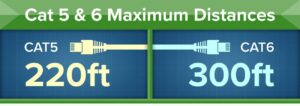
Ethernet spec limits CAT6 to 100 meters. Beyond that, expect packet loss, intermittent disconnections, and PoE power delivery failure. Don’t push it. Use a PoE switch or extender at an intermediate point for longer runs.
4. Poor Cable Termination
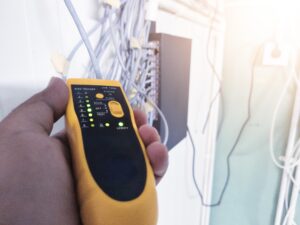
Incorrectly wired RJ45 connectors cause 50% of “camera not working” service calls. Follow T568B wiring standard strictly, maintain twist pairs right up to the connector, and test every termination with a cable tester before connecting equipment.
5. Running Network and Power Cable in Same Conduit
If running separate 24V AC power alongside CAT6 data cable, use separate conduits or maintain 15cm separation. AC power cables induce electromagnetic interference that degrades network performance, especially on longer runs.
Frequently Asked Questions
Can I use CAT5e cable instead of CAT6?
Technically yes, CAT5e supports the camera’s 100 Base-T requirement. However, CAT6 provides better interference immunity and higher bandwidth headroom. The cost difference is minimal (₹2-3 per meter), so CAT6 is the smarter choice for professional installations.
Do these cameras work with standard PoE or require PoE+?
Both models require PoE+ (IEEE 802.3at), which delivers up to 30W. Standard PoE (IEEE 802.3af) only provides 15.4W, insufficient for PTZ motors, IR illuminators, and heater operation. Verify your switch or injector supports PoE+ before purchasing.
What’s the maximum cable length I can use?
Ethernet standard limits CAT6 to 100 meters (328 feet) for both data and PoE power. For longer distances, install a PoE switch or PoE extender at an intermediate point. Each segment can then run another 100 meters.
Should I use outdoor-rated cable even for indoor installations?
Only if the cable path includes any outdoor exposure. Indoor-rated CAT6 costs less and works perfectly fine inside buildings. However, any section exposed to weather (even under eaves) requires outdoor-rated cable with UV-resistant jacket.
Can I mix 4MP and 5MP cameras on the same NVR?
Yes, both models use the same video compression (H.265/H.264) and network protocols. Most NVRs support mixed-resolution cameras. From a cabling perspective, both cameras have identical requirements, so your cable infrastructure doesn’t need to change.
What gauge power cable do I need for 24V AC installation?
For runs up to 50 meters, 1.0mm² (18 AWG) works fine. Beyond 50 meters, use 1.5mm² (16 AWG) to minimize voltage drop. For runs exceeding 100 meters, step up to 2.5mm² (14 AWG) or consider using PoE instead.
The Verdict: Cable Infrastructure Makes or Breaks Your PTZ Installation
Look, the CP-UNP-F4541L30-DPQ and CP-UNP-F4551L30-DPQ are fantastic cameras. Powerful 45x zoom, 300-meter IR range, Starlight low-light performance – they’ve got the specs to handle demanding surveillance applications. But here’s the reality: none of that matters if your cable infrastructure is subpar.
I’ve seen countless installations where installers tried to save ₹500 on cable and ended up with PTZ cameras that freeze mid-rotation, IR illuminators that flicker at night, or connections that fail after three months of monsoon exposure. The camera isn’t the problem – the cables are.
Invest in quality full-copper CAT6 cable from day one. Use proper waterproof boots on outdoor connections. Don’t exceed the 100-meter Ethernet limit. Follow these basics, and your PTZ setup will run reliably for years. Cut corners here, and you’ll be making service calls every few months.
Bottom line? These CP Plus PTZ cameras are professional-grade equipment. They deserve professional-grade cabling. Period.
Need help selecting the right cables for your PTZ camera installation? Our team at JUAA specializes in professional-grade surveillance cabling solutions. Visit our store or get in touch for expert guidance.